Automatic dispatching simplifies the management of booking assignments, ensuring efficiency and reliability in operations. Follow these steps to configure your automatic dispatching rules in the system.
Step 1: Access Dispatcher Management
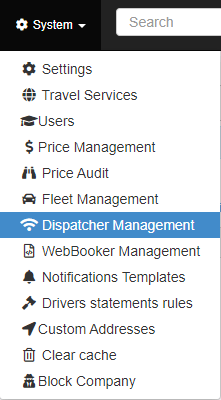
To begin, navigate to the “Dispatcher Management” option within the “System” sub-menu (see Fig. 1).
Step 2: Enable the Automatic Dispatching Engine
Activate the “Enable Automatic Dispatching Engine” toggle to use the automatic dispatching feature (see Fig. 2).
Step 3: Configure Dispatching Rules
The “Dispatcher Rules Calendar” (see Fig. 3) displays the rules for every day of the week. To add a new rule:
Click the “ADD NEW RULE” button.
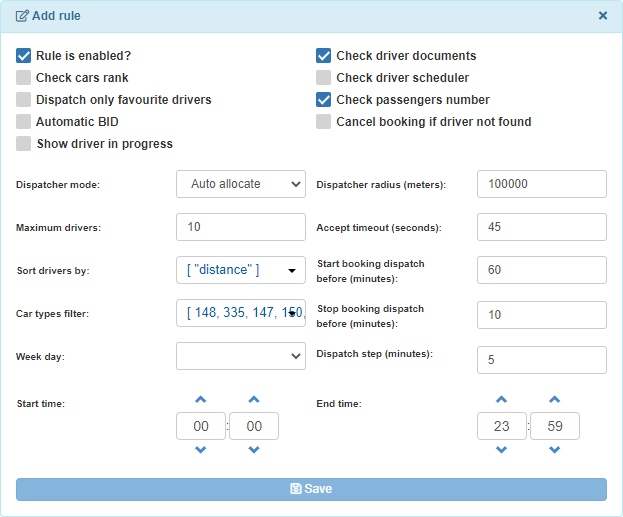
A configuration window will appear (see Fig. 4).
Step 4: Customize Your Rule
In the configuration window, set your desired dispatching conditions:
Driver Checks: Select specific criteria to filter drivers (e.g., availability, ratings).
Vehicle Types: Apply rules to drivers with certain car types.
Sorting Parameters: Define how drivers are prioritized.
Dispatch Timing: Set the time before bookings are dispatched.
Important: Assign the rule to at least one day of the week. Otherwise, the system will not save the rule.
Step 5: Save and Apply the Rule
After configuring the rule, click “Save” to add it to the Dispatcher Rules Calendar (see Fig. 3).
Once saved, the system will automatically apply the rule within the specified time frame.
Key Features of Automated Dispatching
Streamlined Booking Allocation: Automatic assignment of bookings based on predefined criteria.
Customizable Rules: Tailor rules to match your operational needs.
Time-Saving Automation: Reduce manual intervention and improve efficiency.
We use cookies on our website to give you the most relevant experience by remembering your preferences and repeat visits. By clicking “Accept All”, you consent to the use of ALL the cookies. However, you may visit "Cookie Settings" to provide a controlled consent.
This website uses cookies to improve your experience while you navigate through the website. Out of these, the cookies that are categorized as necessary are stored on your browser as they are essential for the working of basic functionalities of the website. We also use third-party cookies that help us analyze and understand how you use this website. These cookies will be stored in your browser only with your consent. You also have the option to opt-out of these cookies. But opting out of some of these cookies may affect your browsing experience.
Necessary cookies are absolutely essential for the website to function properly. These cookies ensure basic functionalities and security features of the website, anonymously.
Cookie
Duration
Description
cookielawinfo-checkbox-analytics
11 months
This cookie is set by GDPR Cookie Consent plugin. The cookie is used to store the user consent for the cookies in the category "Analytics".
cookielawinfo-checkbox-functional
11 months
The cookie is set by GDPR cookie consent to record the user consent for the cookies in the category "Functional".
cookielawinfo-checkbox-necessary
11 months
This cookie is set by GDPR Cookie Consent plugin. The cookies is used to store the user consent for the cookies in the category "Necessary".
cookielawinfo-checkbox-others
11 months
This cookie is set by GDPR Cookie Consent plugin. The cookie is used to store the user consent for the cookies in the category "Other.
cookielawinfo-checkbox-performance
11 months
This cookie is set by GDPR Cookie Consent plugin. The cookie is used to store the user consent for the cookies in the category "Performance".
viewed_cookie_policy
11 months
The cookie is set by the GDPR Cookie Consent plugin and is used to store whether or not user has consented to the use of cookies. It does not store any personal data.
Functional cookies help to perform certain functionalities like sharing the content of the website on social media platforms, collect feedbacks, and other third-party features.
Performance cookies are used to understand and analyze the key performance indexes of the website which helps in delivering a better user experience for the visitors.
Analytical cookies are used to understand how visitors interact with the website. These cookies help provide information on metrics the number of visitors, bounce rate, traffic source, etc.
Advertisement cookies are used to provide visitors with relevant ads and marketing campaigns. These cookies track visitors across websites and collect information to provide customized ads.